
REPSE portal: payment goes out only when the evidence is complete
Your specialized-services provider uploads the evidence for each period in its own portal. Finance checks it against the registry, the contract and the matrix of allowed services, and the traffic light decides: pass, flag or block the payment.

Why a valid registration number is not enough
Three sources that disagree
The contract purpose, the registered activities and what your company may contract say different things.
Late evidence
Payroll, contributions and reports are requested at year-end, when they can no longer be fixed.
Payments without review
The invoice is paid before confirming the period file is complete.
Risk for the client
Joint liability, tax deduction and VAT credit all depend on that evidence.
Nine steps, from the matrix to payment
This is how we teach it in the “REPSE” path of our user academy.
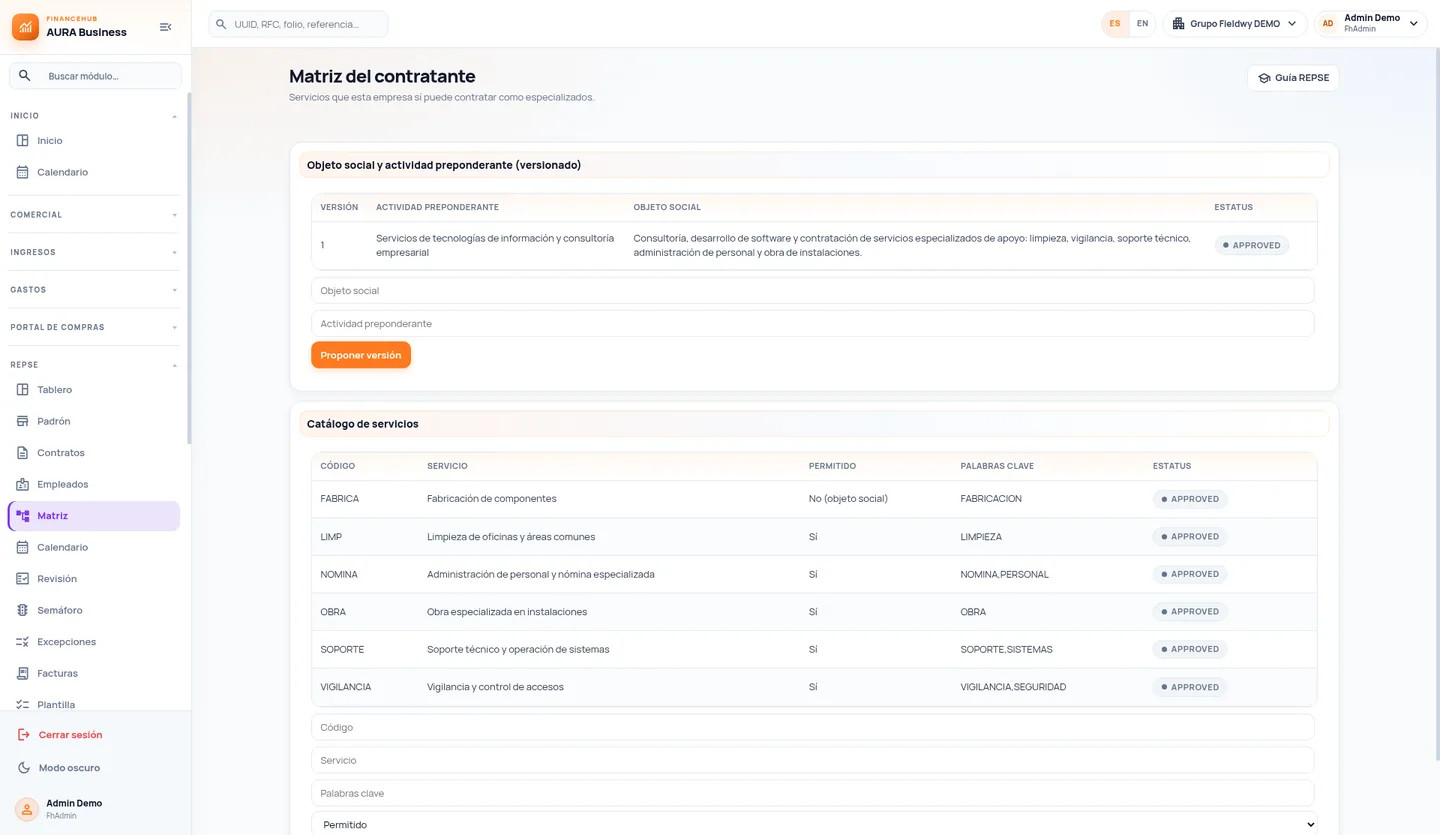
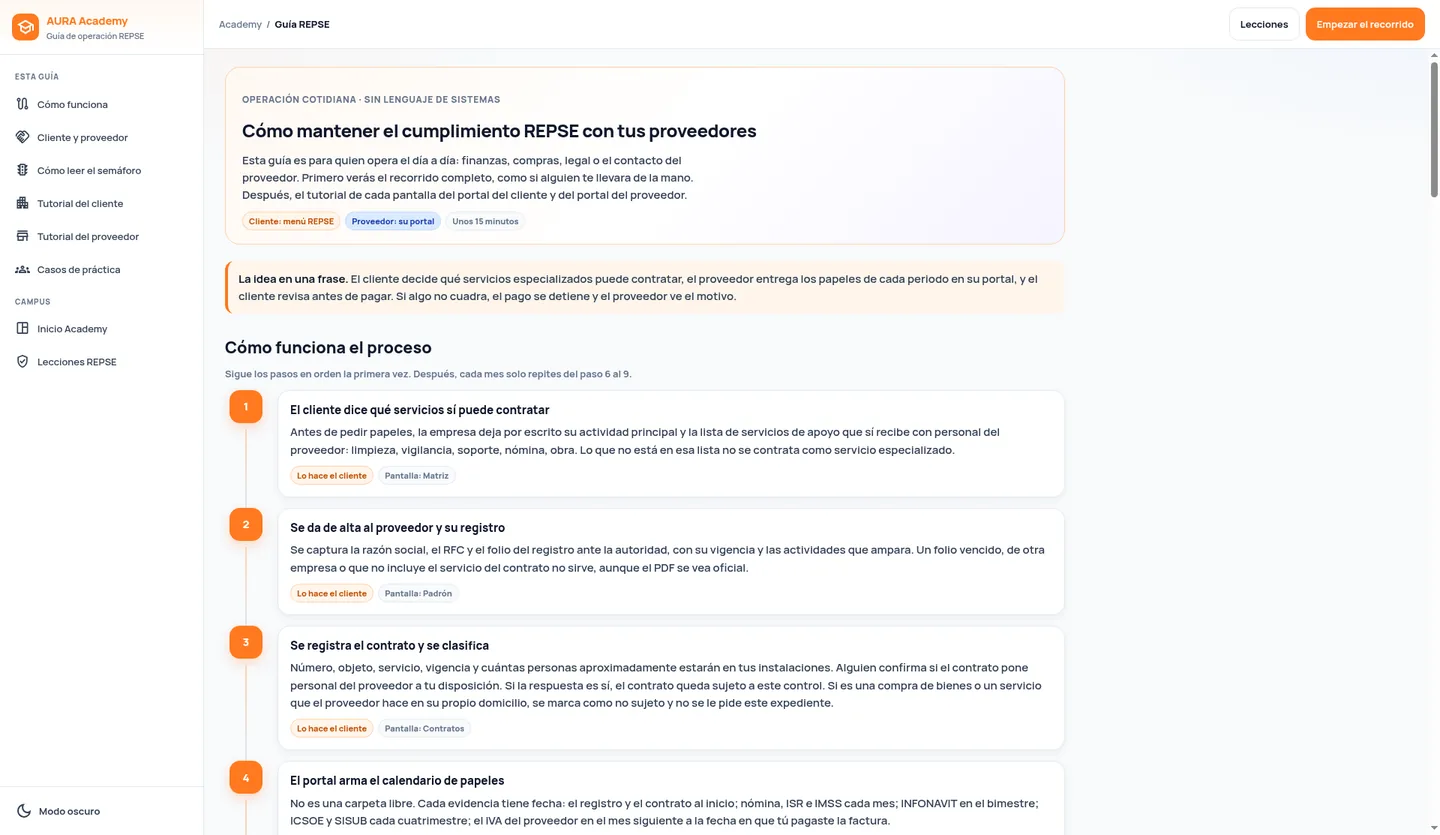
- MatrixYour company defines which services it may contract as specialized and approves the profile.
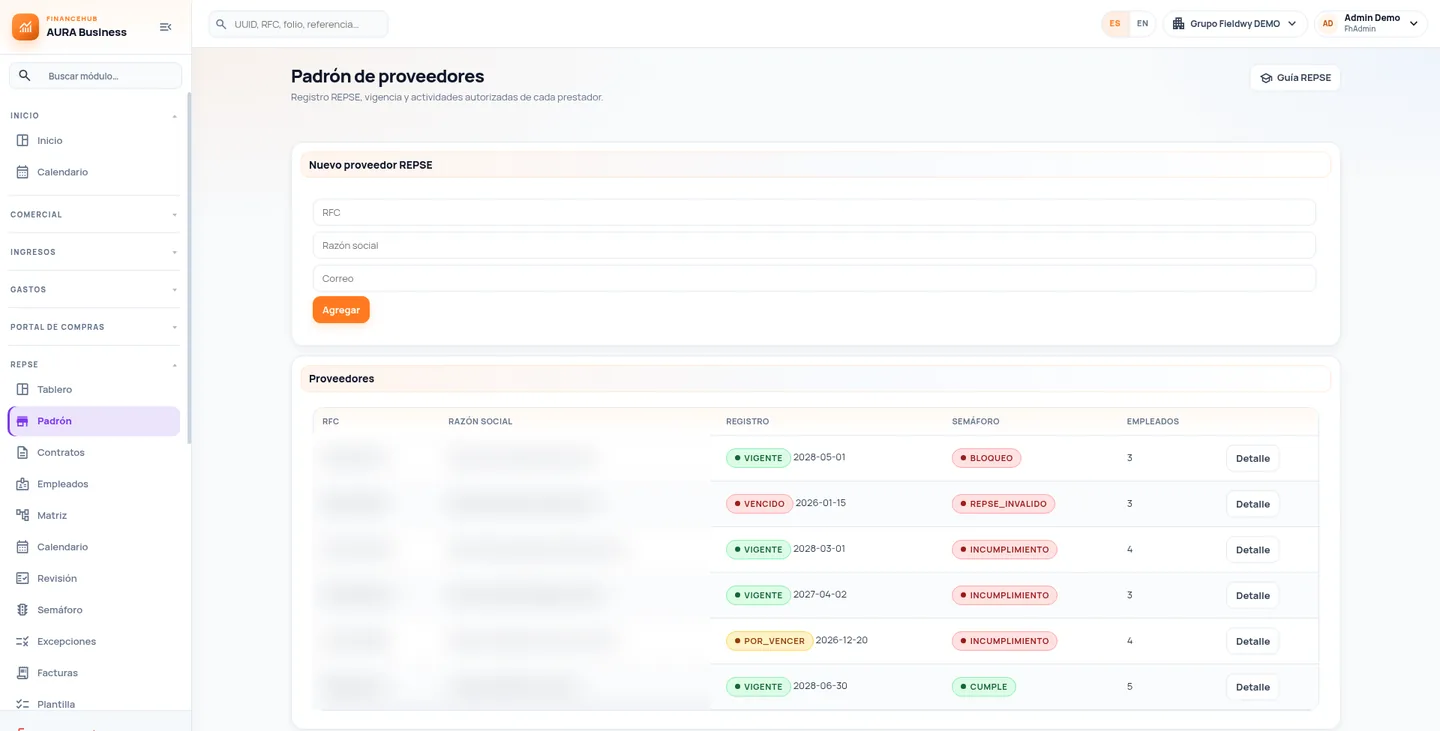
- RegistryEach provider’s REPSE number, validity and registered activities are recorded.
- ContractPurpose, service, term and approximate headcount; classified as subject or not subject, with a reason.
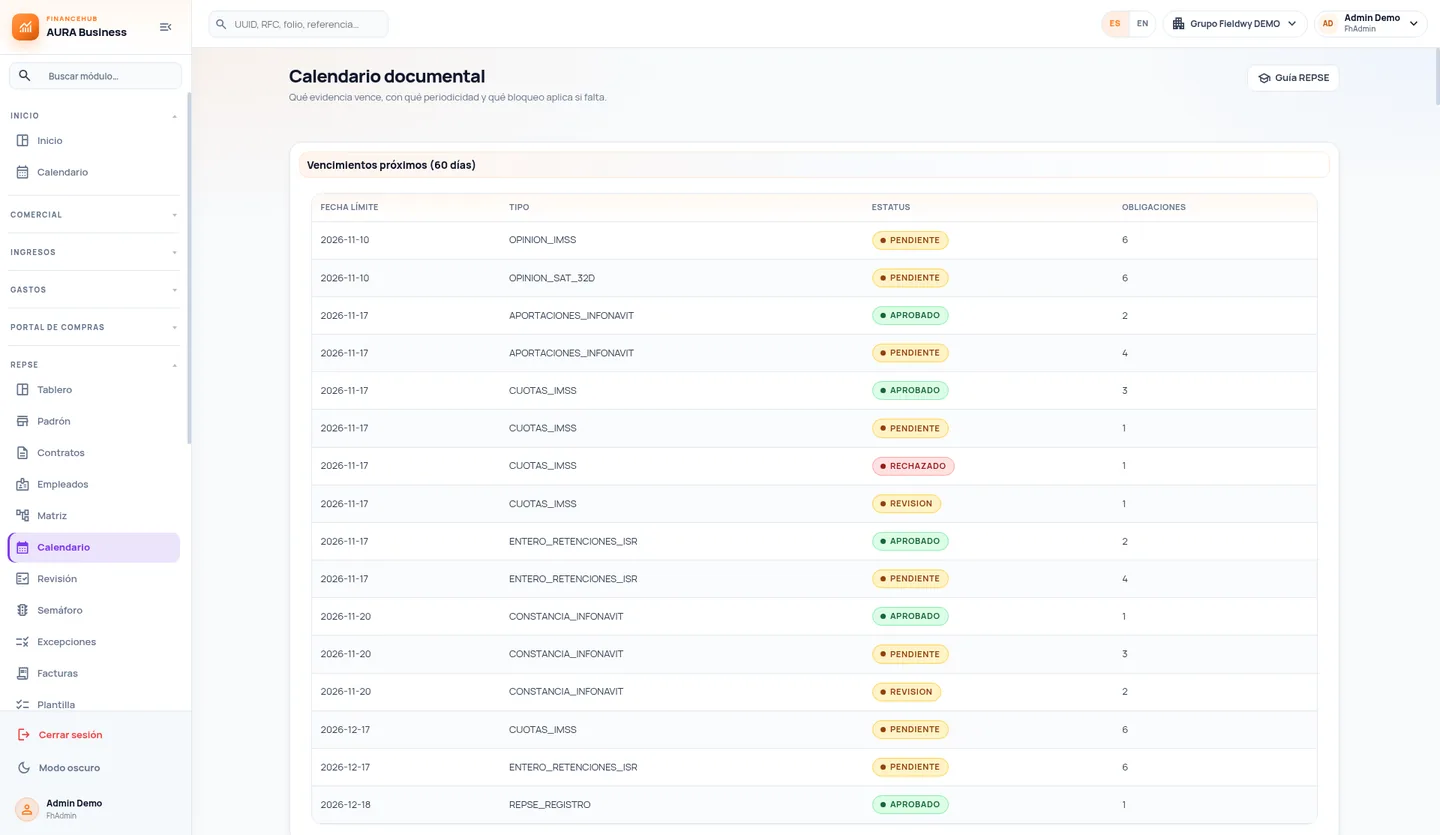
- CalendarThe contract’s obligations are generated: start-up, monthly, bimonthly and four-monthly documents.
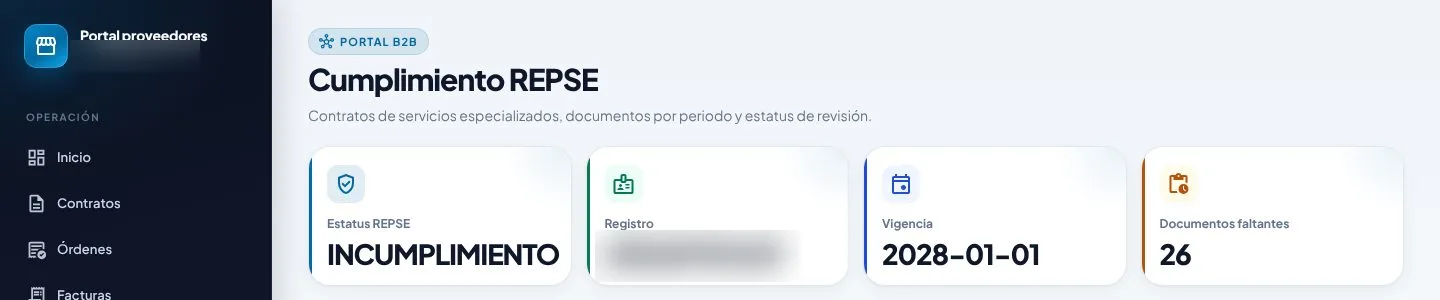
- Provider accessThe provider logs into its portal and sees its contracts and what is missing.
- Evidence uploadIt uploads PDF, XML or ZIP files for each period obligation.
- ReviewYour team approves or rejects with a comment; rejections stay in the log.
- Traffic lightCompliant, expiring, non-compliant or blocked, by provider and by contract.
- Payment gateThe invoice passes, is flagged or is blocked. Exceptions require a reason and an expiration date.
REPSE portal screens
Compliance, evidence and payment in the same file
Versioned matrix
Corporate purpose, main activity and catalog of allowed services, with approval.
Registry with expiration dates
Number, three-year validity and registered activities, with advance expiration alerts.
Evidence calendar
Each document with frequency, deadline and blocking level if it expires.
Traffic light
By provider and contract, with pending and overdue items and reasons.
Payment gate
Invoice → contract → service → period file, before the payment is released.
Provider portal
The provider knows what to submit, when, and why something was rejected.
Controlled exceptions
With reason, owner and expiration date; revoked when they no longer apply.
Audit file
Export by provider and period, recording who generated it.
Guide and training
A learning path for your team and a guide for providers, in plain operational language.
Since 2021, the risk also falls on the client
The reform published in Mexico’s Official Gazette on April 23, 2021 prohibited staff outsourcing and only allowed specialized services or works that are not part of the client’s corporate purpose or main business activity, provided the provider is registered in the STPS REPSE registry (Federal Labor Law, arts. 12, 13 and 15).
The client is jointly liable for the provider’s labor obligations (art. 14) and, to deduct and credit VAT, must check the registration when paying and obtain the period documentation (Income Tax Law, art. 27-V; VAT Law, art. 5-II). That is why the portal checks the evidence before payment.
What changes in day-to-day operations
- Payments with backingEvery specialized-service payment goes out with its file reviewed.
- Expirations in sightRegistrations, documents and reports are visible before they expire.
- Informed providersProviders know what to submit and why something was rejected.
- Audit file readyOne file per provider and period, ready for review or audit.
Teams working on the same file
- Finance and Accounts Payable: invoices are checked against the evidence before payment.
- Procurement: classified contracts and providers with a valid registration from day one.
- Legal and Compliance: a file per provider and period, ready for review.
- Tax: organized documentation supporting deductions and VAT credits.
- Providers: a clear portal showing what to submit and when.
What clients usually ask
Another question? Use the form on this page.
What is REPSE?
The Public Registry of Specialized Services or Specialized Works Contractors kept by Mexico’s Ministry of Labor (STPS). Providers of those services must be registered (Federal Labor Law, art. 15), and the registry can be checked at repse.stps.gob.mx.
When does it apply to my company?
When you contract specialized services or works in which the provider makes its own staff available, and those services are not part of your corporate purpose or main business activity (art. 13). Buying goods, or a service the provider performs at its own premises without placing staff at your disposal, is classified differently. Your company defines the classification with its advisor; the portal documents it.
How often must the registration be renewed?
Every three years (art. 15). The portal records each provider’s validity and alerts in advance. An expired or canceled registration marks the provider as invalid REPSE.
What must the contract state?
It must be in writing and state the purpose of the services or works and the approximate number of workers involved (art. 14). The portal stores the contract and cross-checks it with the matrix and the registration.
Which documents does SAT require to deduct and credit VAT?
When paying, check that the provider is registered and obtain copies of the staff’s payroll CFDIs, the payment of income-tax withholdings, and IMSS and INFONAVIT contributions (Income Tax Law, art. 27-V). For VAT, a copy of the provider’s VAT return and payment receipt, no later than the last day of the month after payment (VAT Law, art. 5-II).
What are ICSOE and SISUB?
Four-monthly reports filed by the provider: ICSOE with IMSS (Social Security Law, art. 15-A) and SISUB with INFONAVIT (INFONAVIT Law, art. 29 Bis), no later than the 17th of January, May and September. Your company does not file them, but it is wise to collect the acknowledgment as part of the file.
What if the evidence is incomplete at payment time?
The payment gate flags or blocks the invoice according to the rule your company sets. If you decide to pay with a pending item, an exception is recorded with reason, owner and expiration date.
What are the risks of non-compliance?
Joint liability for the provider’s labor obligations (art. 14), loss of the tax deduction and VAT credit for those payments (Federal Tax Code, art. 15-D; Income Tax Law, art. 27; VAT Law, art. 5) and fines the Federal Labor Law sets at 2,000 to 50,000 times the UMA (art. 1004-C).
For information only; this is not legal or tax advice. Regulatory references cite Mexican law in force as of November 2026 (Federal Labor Law, Social Security Law, INFONAVIT Law, Income Tax Law, VAT Law and Federal Tax Code) and the official STPS, IMSS, INFONAVIT and SAT portals. Specific obligations depend on each contract and should be confirmed with your advisor. Screens show demo data.
Tell us how you operate today
A specialist reviews your case and prepares the demo around a scenario similar to yours.
- Session with a specialist in finance and compliance processes.
- Your operation as the example, not a generic demo.
- Phased scope, defined with your team.