
Manage processes, case files and documents with end-to-end control
Design, run and monitor your processes on a single platform: workflows, 360° case file, document management, SLAs and dashboards, with an owner and an audit trail for every case.
Web and mobile · Integration with ERP, CRM and core systems · Visual workflow configuration
Case file document checklist
Version 2 · uploaded by account executiveValid
Reviewing powers of attorneyUnder verification
Expires in 12 daysExpiring soon
Requested from clientMissing
When the process lives in emails, spreadsheets and shared folders
Critical operations involve multiple departments, documents and approvals. Without a common platform, control depends on people's memory.
No clear status
No one knows for sure which stage each request is in or who has it.
Scattered documents
Duplicate versions, expiry dates nobody monitors and incomplete case files.
Unmeasured timelines
Delays are detected only after the client has complained.
Difficult audits
Reconstructing who approved what takes days and depends on emails.
Everything a process needs, in one place
FLOW brings together components that normally live in separate systems. Your team works from the same screen and leadership sees the real status of the operation.
BPM and workflows
Design and run processes with rules, routes and owners.
Learn more360° case file
All client or case information in one place.
Learn moreDocument management
Checklist, expiry dates, versions and templates.
Learn moreForms and templates
Structured data capture and generated documents.
Learn moreSLAs and operational control
Times per activity, alerts and escalation.
Learn moreDashboards and integrations
KPIs, audit trail and connection to ERP, CRM and core systems.
Learn moreEvery case with a number, owner and response time
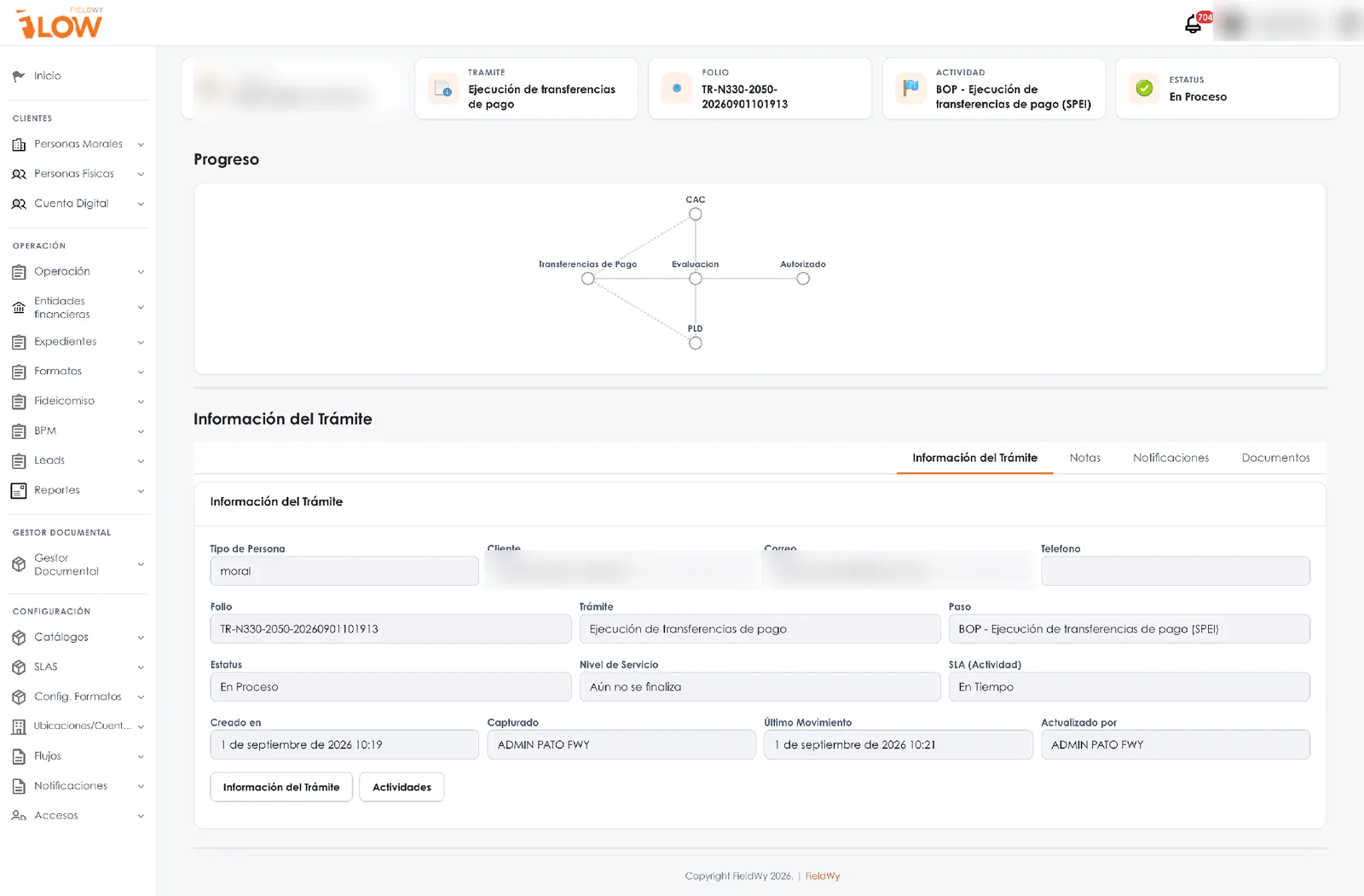
Every request receives a unique case number and moves through the stages you defined. Every activity has an owner and an SLA, and the system alerts you before anything becomes overdue.
- Configurable routes and rules: decisions, approvals and returns with comments.
- Per-activity SLA: on time, due soon or overdue, with notification and escalation.
- Complete audit trail: every change is recorded with user and date.
The case file stops being a folder and becomes a process
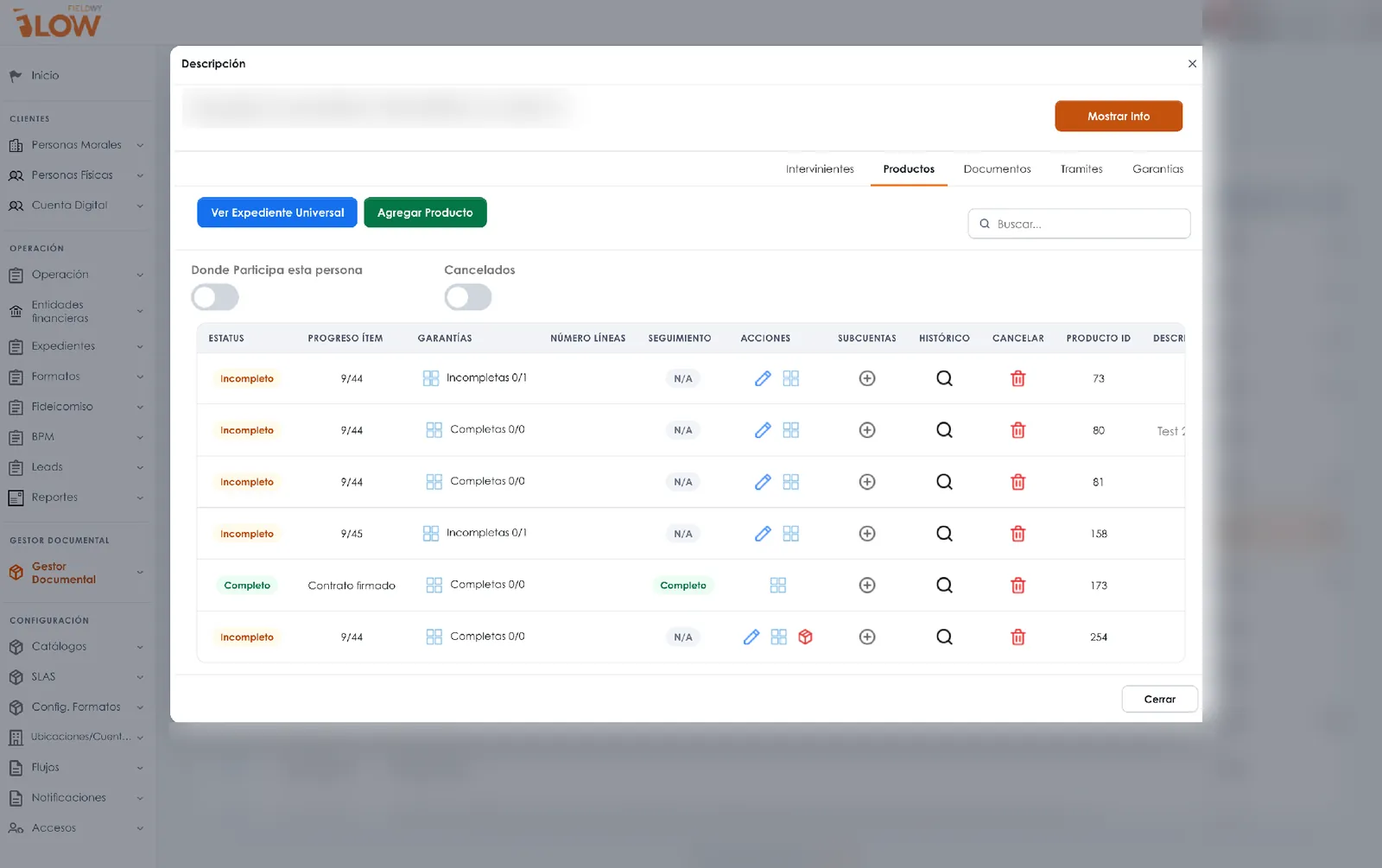
FLOW builds the document checklist based on client type and product, monitors expiry dates, keeps versions and generates contracts from templates using case file data.
- 360° case file: individuals and legal entities with their related parties (shareholders, attorneys-in-fact, beneficiaries), each with their own case file.
- Capture once, reuse always: current documents can be reused for new products.
- Expiry dates and alerts: the system warns you which document is about to expire.
- Role-based access: each department sees only what it is entitled to.
Design, run, control and improve
A continuous cycle: the process is documented in the platform and refined with real operational data.
Design
Model stages, decisions, forms, documents and owners in the visual designer.
Run
Every case moves forward with a case number, assignment and evidence, on the web or from the mobile app.
Control
SLAs, alerts, escalation and dashboards show the real status of every process.
Improve
Identify bottlenecks and adjust rules or routes without rebuilding the system.
Processes ready to adapt to your operation
We start from processes we already know in each industry and configure them with your rules, documents and departments.
Fintech, banking, insurance and non-bank lenders
Onboarding, case files, legal opinion review and AML compliance.
See solutionsLogistics and retail
Orders, warehouse, proof of delivery and point-of-sale execution.
See solutionsTelecom, services and field operations
Sales and technical field force, service orders, routes and visits.
See solutionsHealthcare, technology and cross-functional processes
Procurement, HR, suppliers, self-billing and service.
See solutionsProcesses digitized with FLOW
Operations, visible to decision-makers
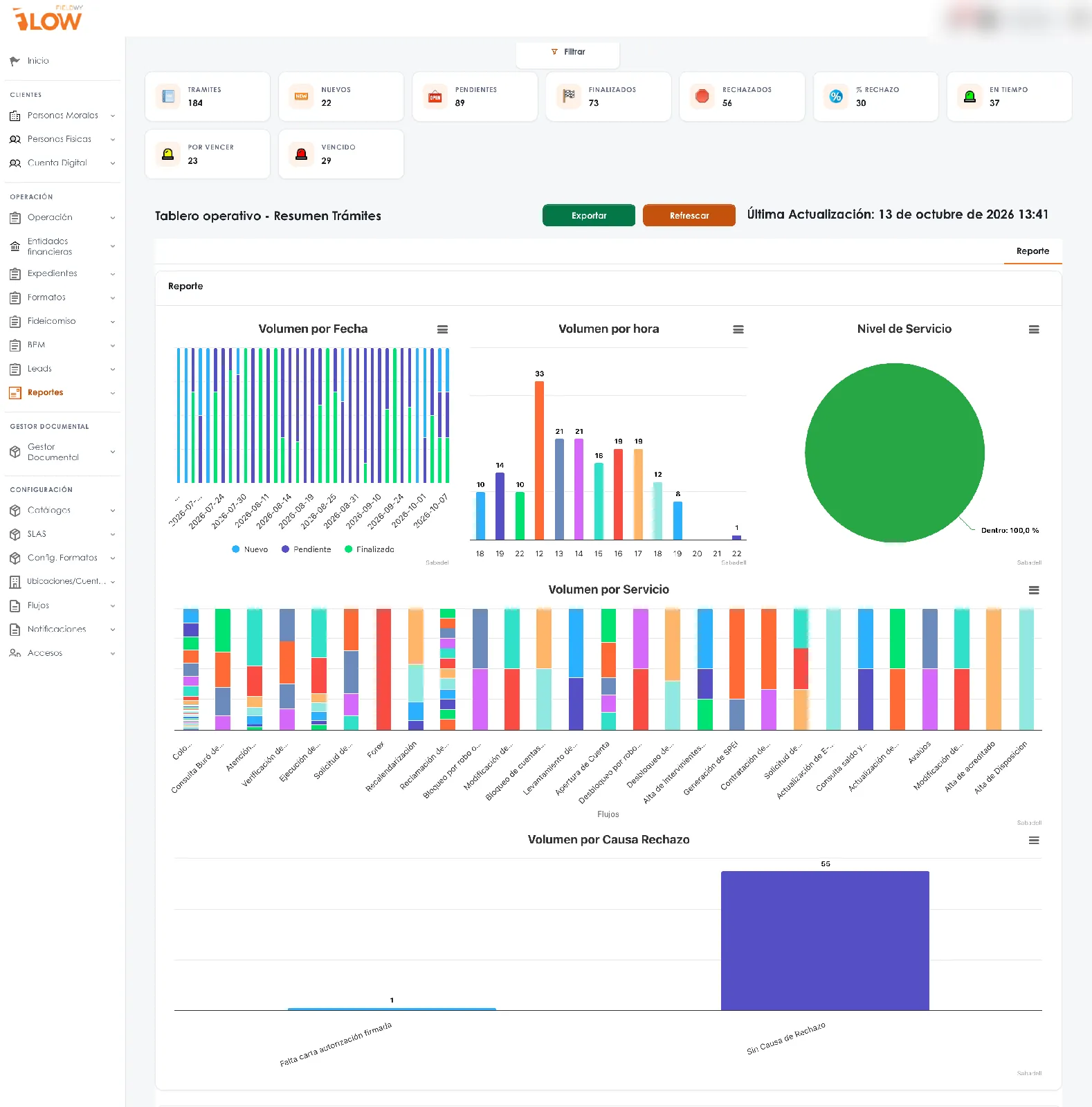
Dashboards with volume by stage, rejections, service level and workload by owner. The information comes from daily operations, with no manually assembled reports.
- KPIs by process, department and period.
- Drill down to the individual case and its evidence.
- Data export and integration with BI tools.
AI applied where it adds value, always under your control
With the AURA module, FLOW can read documents, extract data and propose a resolution for your team to validate. It is a capability enabled per process; control and decisions remain with your organization.
Real operations, described without names
For confidentiality, we describe cases by industry. In the demo we can go deeper into the one closest to your operation.
Business banking
Onboarding, document management, client verification, signature and SLAs in a single case file per client.
Multi-country telecommunications
Sales and field management: points of sale, routes, offline app, surveys and evidence.
Beverage company with national coverage
Point-of-sale execution and audits with photo and geotagged evidence.
Consumer goods
Licensing procedures, budget control and approval workflows across departments.
A phased path with a clear scope
We start with one process, put it into operation with real users and scale up based on results.
- 01 · AssessmentWe understand the current process, its departments, documents and control points.
- 02 · ConfigurationWe model workflows, forms, templates, rules, SLAs and integrations.
- 03 · PilotOperation with real users, training and adjustments.
- 04 · Scale-upMore departments, processes and integrations, with ongoing support.
Frequently asked questions
Have another question? Write to us at contacto@fieldwy.com.
What is FieldWy FLOW?
It is a BPM platform for designing, running and monitoring business processes. It brings together case files, document management, forms, templates, SLAs and dashboards in one place, with an audit trail of every action.
Do we need to write code to configure processes?
Not for the configuration layer: workflows, forms, rules, templates and SLAs are defined visually. For integrations with your systems, our team works with yours through APIs, web services or SFTP.
Does it integrate with our ERP, CRM or core system?
Yes. FLOW connects with existing systems to query and send information, so the process never forces anyone to enter data twice. The scope of each integration is defined during the assessment.
How is sensitive information handled?
With access by role and position, approval hierarchies and an audit trail that records who did what and when. Hosting and security conditions are reviewed with your IT team on every project.
What role does AI play?
It is an optional capability, delivered through the AURA module: it reads documents, extracts data and proposes a resolution. The decision is always made by an accountable person, and it is recorded.
What does an implementation look like?
In phases: process assessment, configuration, pilot with real users and scale-up to more departments or processes. Scope and timeline are agreed with you at the start.
Does it work in the field and offline?
Yes. The mobile app lets you complete forms, checklists, evidence and visits offline, and syncs when the connection returns.
See FLOW with a process from your operation
Schedule a demo. We review your current process and show you how it would look in FLOW: stages, owners, documents, timelines and dashboards.
- Session with a specialist in your industry.
- Your process as the example, not a generic demo.
- Scope proposal in phases, defined with your team.
- Email: contacto@fieldwy.com